Ulanzi AU05 Wireless AI Keyboard with Microphone | 3 Buttons & 1 Dial | One-Touch Voice Dictation

Skip to product information
1of9

Ulanzi

Ulanzi AU05 Wireless AI Keyboard with Microphone | 3 Buttons & 1 Dial | One-Touch Voice Dictation

Ulanzi AU05 Wireless AI Keyboard with Microphone | 3 Buttons & 1 Dial | One-Touch Voice Dictation

Regular price Rs. 8,699.00
Regular price Rs. 12,999.00 Sale price Rs. 8,699.00
Sale Sold out
All inclusive taxes.Shipping calculated at checkout.
Global Creator Brand Ranked No.1 by Sales Volume of Photography Accessories in the World

About this item

  • 【Controllo Vocale AI con un Tocco: Programmazione Intelligente e Input Naturale】Il VibeKey integra un microfono omnidirezionale e tasti fisici per trasformare la voce in comando immediato. Premi il tasto vocale, parla naturalmente e lascia che l'AI generi codice o esegua istruzioni in tempo reale. Compatibile con ChatGPT, Claude, Codex e altri strumenti AI, è l'alleato perfetto per sviluppatori e professionisti che vogliono accelerare il flusso di lavoro senza abbandonare l'intuitività tattile
  • 【Input Vocale Sussurrato per Comunicazione Discreta e Flusso Costante】Grazie alla tecnologia di riconoscimento vocale a basso volume, puoi dettare comandi AI anche in ambienti silenziosi come biblioteche o uffici open-space senza disturbare chi ti circonda. Il microfono cattura chiaramente il sussurro, mantenendo intatta la concentrazione e la produttività in ogni contesto
  • 【Interazione Fisica Totale: 6 Tasti Personalizzabili e Manopola Multifunzione】Con sei tasti globali personalizzabili e una manopola rotante pressibile, il VibeKey riduce al minimo i passaggi tra tastiera e mouse. Ruota per scorrere tra le conversazioni AI, premi per confermare o annullare, configura scorciatoie per aprire nuove sessioni o attivare funzioni specifiche. Ogni operazione è immediata, precisa e adattabile al tuo flusso di lavoro ideale
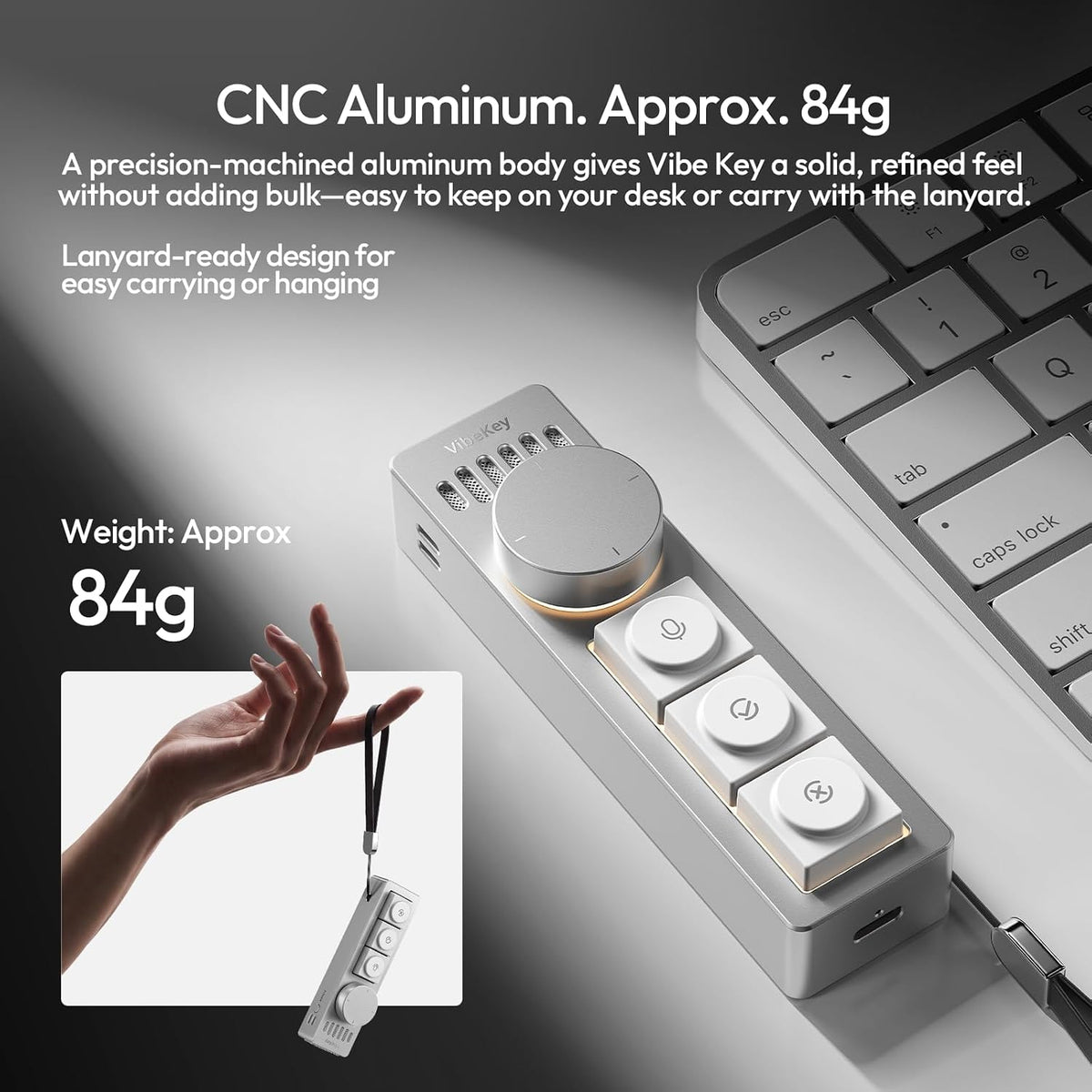
  • 【Design Premium in Alluminio CNC con Illuminazione di Stato Intelligente】Realizzato in lega di alluminio lavorata CNC, il VibeKey unisce leggerezza e solidità con un'estetica da scrivania senza compromessi. Le tre modalità di illuminazione — Lavoro, Luce Piena e Risparmio Energetico — forniscono feedback visivo immediato sullo stato operativo, riducendo l'ansia dell'attesa e ottimizzando la gestione energetica durante sessioni prolungate
  • 【Ecosistema MagSafe e Personalizzazione Meccanica: La Tua Postazione AI Ovunque】Il design MagSafe permette di ancorare il VibeKey saldamente alla scrivania o trasportarlo facilmente tra ambienti diversi, integrando perfettamente scenari fissi e mobili. I tasti meccanici hot-swap con switch Gateron low-profile e le keycap personalizzate DDL (DeadlineStudio) offrono una resa tattile unica e la libertà di modulare la sensazione di pressione secondo le tue preferenze, completando il tuo setup AI personalizzato

Our Ulanzi Guarantee

Official India Distributor Authorised by Ulanzi
Ships in 24 Hrs Fast & reliable dispatch
2-Day Replacement Hassle-free support
1 Year Warranty On all Ulanzi products
10 Lakh+ Customers Trusted across India
GST Billing Available at checkout
View full details
Rs. 8,699Rs. 12,99933% offIncl. of all taxes
1

QUICK PRODUCT HIGHLIGHTS

Frequently Asked Questions

All orders are dispatched within 24 hours of placing the order.

If you receive a damaged or defective item, please contact our customer support within 48 hours for a quick resolution.

Yes, all products are 100% original and made with premium quality materials, trusted by over 10 lakh customers.

You can reach our customer support team easily through the WhatsApp button available on our website. We’re here to assist you!

Manufacturer ‏ : Master Digital, 33/06, Industrial Area, Site-2, Loni Road, Ghaziabad, Uttar Pradesh, India-201007

Importer: Master Digital, 33/06, Industrial Area, Site-2, Loni Road, Ghaziabad, Uttar Pradesh, India-201007

Country of Origin ‏ :China

Net Quantity:1

Included Components:1 x Au05, 1 x Vibe Key, 1 x Charging Cable, 1 x User Manual

  • 5 stars: 32 (100%)
  • 4 stars: 0 (0%)
  • 3 stars: 0 (0%)
  • 2 stars: 0 (0%)
  • 1 star: 0 (0%)
M
Mohit Jain
Modern Design with Practical Functions

Its modern appearance and compact size make it a suitable addition to a computer workstation.

D
Divya Nair
Helpful for Managing Daily Tasks

It can be useful for managing common computer tasks and accessing supported commands quickly.

S
Shreya Das
Convenient Knob and Shortcut Controls

The multifunction knob adds another control option for compatible applications and supported functions.

H
Harsh Vashisht
Useful Device for a More Efficient Workflow

Overall, the compact keypad brings voice input and customizable controls together in one productivity accessory.

S
Simran Kaur
Useful Controls in a Compact Design

The physical controls provide a convenient way to access supported functions without navigating multiple menus.

A
Ananya Mishra
Useful Shortcut Keys for Faster Access

The shortcut buttons provide convenient access to frequently used functions when configured appropriately.

N
Nisha Thakur
Easy to Set Up and Use

The straightforward layout makes it easier to learn the purpose of its different physical controls.

M
Manish Tiwari
Smooth Operation and Functional Layout

The keypad combines several physical controls in one compact device, helping keep a workspace organized.

A
Amit Sharma
Handy Device for Quick Text Input

Its small size makes it easy to place alongside a keyboard, laptop, or other desk accessories.

R
Rohan Kumar
Helpful for Everyday Computer Work

This keypad can be a handy addition for people who regularly work on a computer for different tasks.

M
Meera Iyer
Functional Keypad for Everyday Use

The physical buttons and knob provide a different way to interact with compatible software and commands.

K
Kavya Reddy
Smart Design for Daily Workflows

The combination of physical buttons and a multifunction knob offers flexibility for compatible tasks.

S
Sneha Yadav
Simple Controls and Clean Design

The controls are arranged in a simple layout, making the device easy to understand and operate.

V
Varun Saxena
Useful for Writing and Office Tasks

This device may be useful for writing, office work, and other tasks that benefit from quick text input.

A
Aditya Chauhan
Convenient Tool for Voice Dictation

Voice dictation can be convenient when composing notes or entering longer pieces of text.

A
Arjun Patel
Practical AI Voice Input Accessory

The AI voice input function is an interesting feature that can be helpful for compatible productivity workflows.

A
Akash Pandey
A Handy Tool for Computer Users

The device offers a compact alternative for users looking to explore voice input and shortcut controls.

P
Pooja Mehta
Good Addition to a Work Desk

The design looks modern and the device offers useful functionality for a productivity-focused workspace.

N
Neha Gupta
Makes Writing Tasks More Efficient

It is a useful accessory for writing tasks and helps make my daily computer work more convenient.

R
Ritika Sinha
Helps Simplify Repetitive Tasks

Having dedicated controls for supported shortcuts can help simplify repetitive parts of a workflow.

I
Ishita Agarwal
A Practical Accessory for Productivity

This accessory is designed for people who want convenient controls for their everyday computer workflow.

S
Sahil Arora
Compact Design Saves Desk Space

The compact design is practical for smaller desks and workstations where space is limited.

P
Priya Verma
Easy Voice Input and Quick Commands

The voice input feature is useful for entering text quickly and reducing the need for manual typing.

K
Karan Malhotra
Easy Access to Frequently Used Commands

Customizable shortcuts can be useful for accessing frequently used commands more efficiently.

V
Vikram Joshi
Comfortable and Easy to Operate

Its compact form and straightforward controls make it practical for a desk setup.

A
Aarav Sharma
Convenient Device for Daily Productivity

This device offers a convenient way to handle everyday productivity tasks and makes my workflow feel more organized.

R
Rahul Singh
Compact Keypad with Useful Features

The compact keypad has practical features and fits nicely on my desk without taking up much space.

K
Kunal Malhotra
A Handy Desk Companion for AI and Coding

This is a useful little device for my desk setup. The combination of AI voice input, shortcut buttons, and control knob makes my workflow more efficient.

R
Rohan Verma
The Shortcut Buttons Are Great for Daily Work

The shortcut buttons are very useful for repetitive tasks. They save time and make it easier to access the functions I use frequently.

A
Aditya Kapoor
Smooth Voice Dictation and Easy AI Controls

Voice dictation works smoothly and makes interacting with AI much easier. The controls are simple to understand and convenient for everyday use.

V
Vihaan Mehta
Compact AI Keypad with Really Useful Controls

I really like the compact design and the dedicated controls. The keypad fits nicely on my desk and makes my regular workflow more comfortable.

A
Aarav Sharma
Voice Input Made My AI Workflow Much Faster

The voice input feature makes my daily AI tasks much quicker and more convenient. I can speak naturally instead of typing everything manually.